
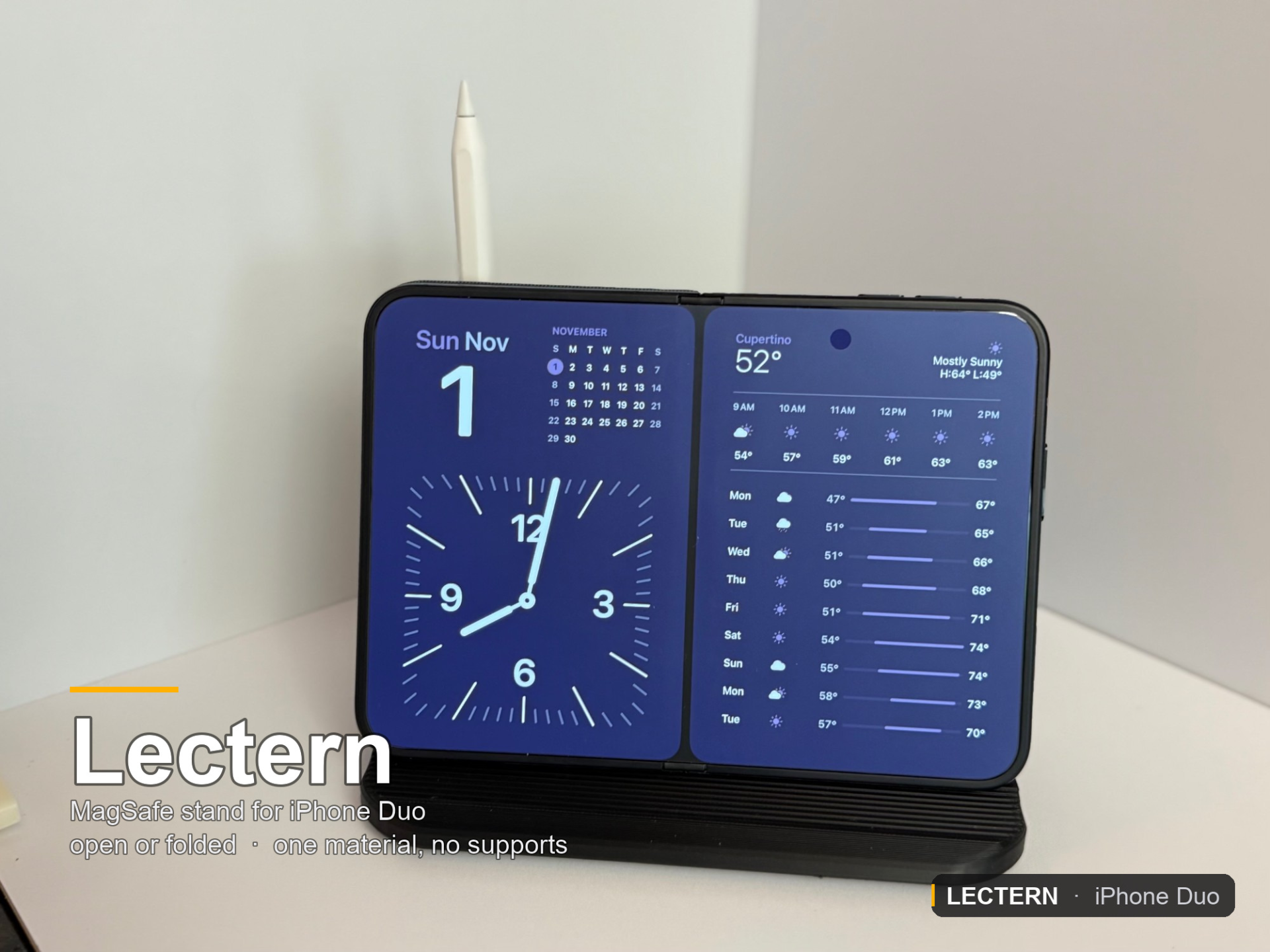
The Lectern — iPhone Duo MagSafe stand + Pencil
Peso
154g
Tiempo
7h 26m
Precio
Pregunta por WhatsApp por este modelo o uno similar
Te ayudamos a conseguir este diseño o uno parecido, con precio según color y acabado
Las dimensiones dependen del diseño. Confirmamos las medidas exactas por WhatsApp.
Este diseño es de su creador en MakerWorld y se muestra solo como referencia. Tecnoprints no es dueño del modelo ni de su licencia.
Descripción
Put your Duo on an ordinary MagSafe stand and it swings round to the left. That isn't the stand's fault — unfolded, the Duo's charging coil sits 39 mm right of centre, and every stand ever made puts the magnet in the middle. This one puts the pocket where the coil actually is, so the phone hangs level. It charges open or folded, hides the cable inside the backrest, and parks an Apple Pencil. One piece, one material, no supports. The Duo opens into a two-page spread, so it wants the thing that holds a book open at a lean. That’s all this is: a flat ledge, a face at 18°, and a pocket for a MagSafe puck. It charges the phone open or folded — the ledge is flat and open at the front, with no lip and no two-width channel, so it doesn’t care how thick the thing standing on it is. Shut, the phone stands on the same ledge against the same face and charges the same way. The cable goes through the stand, not round it The cord drops out of the rim into open air, turns inside the window, and comes out the back into a channel that has no ceiling anywhere — so you press the cable in rather than threading it, and none of it needs support. The USB-C plug threads through that same window sideways: its 15 mm width across the window’s 16.5, its 7.5 mm thickness up the window’s 17.9. One hole, both jobs. The puck is held by two ribs, not a gasket The bore is an honest slip fit on ø57.25 and all the interference lives on two ribs at 3 and 9 o’clock, 0.35 mm proud, 1.6 mm of crest each. They sit dead across the face because that is the one axis where this bore is a true cylinder at every depth — the roof is swept up the face to keep it printable, which leaves a lobe at 12 o’clock. They oppose each other, so shifting the puck sideways makes one rib gain exactly what the other gives up and the squeeze never changes. A hard shove with both thumbs puts it in. If yours is tight, the ribs start 1.2 mm below the face and the whole of both is reachable with a blade through a 57 mm mouth. Bare plastic has to grip, so the ledge is combed Lying on the face at 18° the phone pushes its foot forward with 0.29 of its weight while pressing down with 0.91, so the ledge needs µ > 0.33 — and bare PLA against a case sits right on that line. So the ledge is combed into nine ridges running across the stand, crests at exactly the height the puck expects, 2.2 mm pitch, 0.6 deep. Narrow crests put the same weight through a tenth of the area, which is what actually bites into a soft case. Apple Pencil parks in the base A ø9.6 socket straight down into a low blister on the tail — Pencil Pro, 2nd gen and USB-C all drop in. It’s a vertical cylinder with a vertical hole down it, so there’s no overhang anywhere on it, and it’s out at the left where the leaning phone isn’t in the way of a 166 mm pencil. Print settings PrinterBambu Lab H2C, 0.4 nozzle — fits any 256 mm bedMaterialBambu PLA Basic, black (as shown). PETG or ASA work too.SupportsNoneProfile0.20 mm High Quality, 5 walls, 25 % adaptive cubic, 6 top / 4 bottomBrimLeft on auto — on an 87 × 157 mm flat footprint it normally decides it doesn’t need oneOrientationAs exported. It stands on its own base.Feet (optional)Bambu TPU 90A, plate 2, pads down 5 walls and 25 % is more than this part needs to be strong, that’s deliberate — the mass is what stops a 280 g phone leaning on it from walking the stand across the desk. Print it lighter and it’ll still hold; it’ll just slide. Single-material printers: you’re fine Plate 1 of the 3MF is the entire stand — print that on any single-extruder machine and you have a finished thing. Peel-and-stick rubber or felt pads do the same job, and the four sockets under the base are ø7 flats, which is a standard self-adhesive bumper size, so a pad drops straight into one. Hardware A round 25 W MagSafe puck — the one this is built around is amazon.com/dp/B0H6LN8MXS, measured at ø57.0 × 6.34 mm with a ø3.0 cable leaving the rim. Apple’s own MagSafe puck is thinner (~4.6 mm) and will not drop in. If yours is different, it’s two numbers in the source — see below. Four stick-on rubber or felt pads, ø18 or smaller (optional, or print feet.stl in TPU). Nothing else. No screws, no magnets, no inserts. Assembly Thread the USB-C plug through the cord window from the front, before anything else. Sideways — 15 mm width across the window, 7.5 mm thickness up it. Pull the slack through and press the cable into the open channel down the back and out the tail. Two pinch points hold it. Push the puck into the pocket. It wants a firm shove with both thumbs. If it won’t go, shave the two ribs at 3 and 9 o’clock with a blade; if it’s loose, raise grip_h and reprint. Stick four pads on the underside (or push a TPU foot up into each socket — they go in one at a time). Phone on. Foot on the ledge, back against the face. The TPU feet are a tight fit on purpose. Get it damp, press it into the hole with your thumb while rotating back and forth. Make it fit your puck Everything derives from params.scad, and the Customizer groups are numbered in plain English. The two you’d actually reach for: ChangeWhat it doespuck_d, puck_tYour puck’s diameter and thickness. Everything re-derives: pocket, roof sweep, grip ribs, cord window.grip_hHow tight the puck is. Raise it if loose, lower it if it won’t go in.back_runHow much room the cord has to turn. Drop it if your cable is stiff and won’t make the bend.plug_wYour plug’s width — this is what sizes the cord window.Files lecturn_stand.3mf — two plates, settings applied. Plate 1 is the whole model. lectern.scad — parametric source, OpenSCAD
Tags
Diseñador
clusterflux