
Custom Paper Embosser - Text & SVG Print-In-Place
Peso
13g
Tiempo
38m
Precio
Pregunta por WhatsApp por este modelo o uno similar
Te ayudamos a conseguir este diseño o uno parecido, con precio según color y acabado
Las dimensiones dependen del diseño. Confirmamos las medidas exactas por WhatsApp.
Este diseño es de su creador en MakerWorld y se muestra solo como referencia. Tecnoprints no es dueño del modelo ni de su licencia.
Descripción
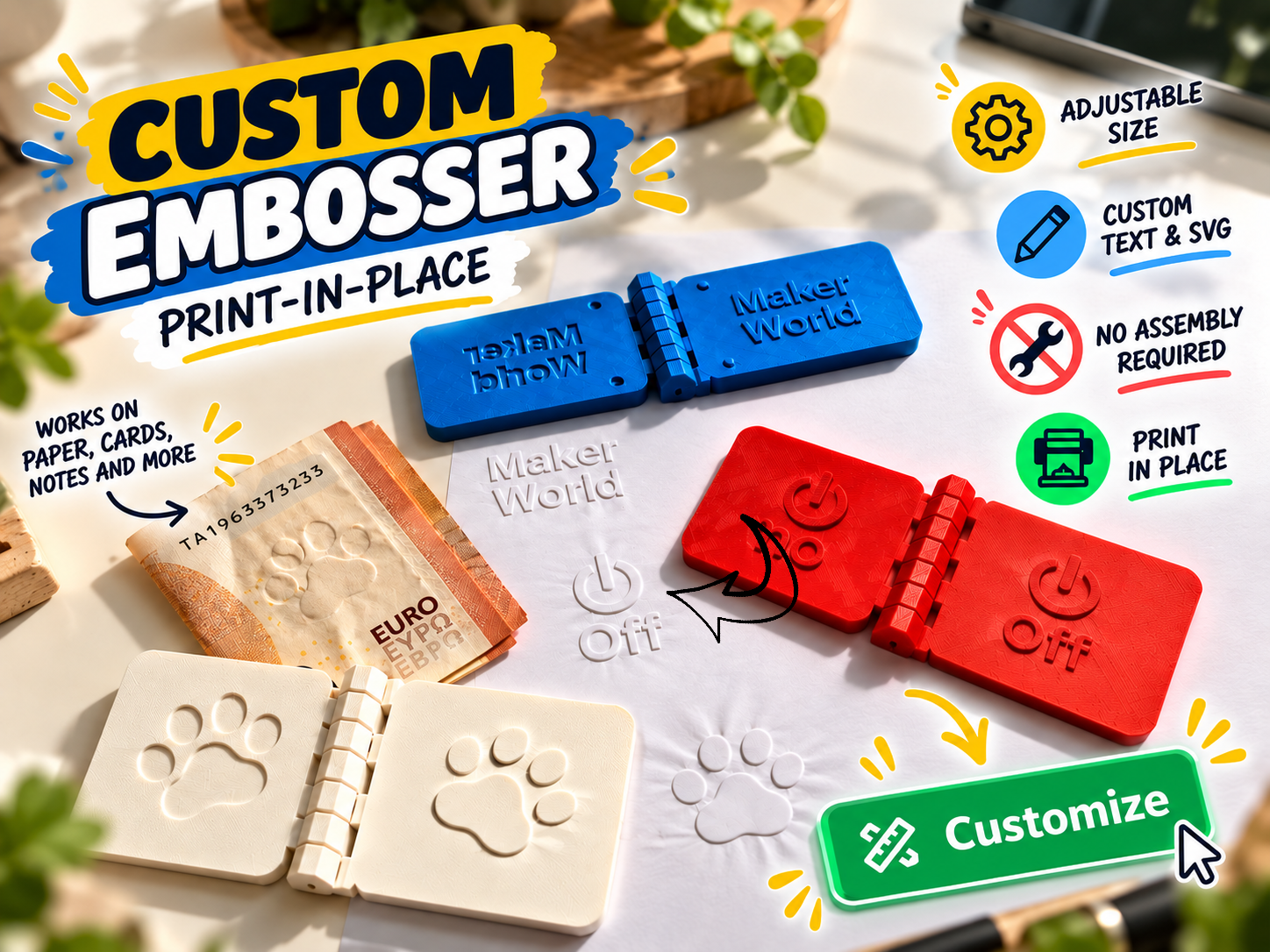
Additional permission for physical prints You may use the customizer to create personalized embossers and print, give away or sell the resulting physical stamps, including versions customized with your own text or artwork. No separate commercial permission or payment is required. This additional permission applies exclusively to physical prints. It does not authorize sharing, selling, redistributing or republishing the SCAD source code or generated digital model files, or incorporating the source code into another generator. All other terms of the Standard Digital File License remain applicable. You are responsible for obtaining any necessary rights to the text, logos or artwork you upload. Boost MeIf you enjoy this project and give it a print, please consider leaving a Boost! Your support helps me keep creating and sharing free projects for everyone. Thank you! ❤️✉️ Your design, pressed into paper Add a personal detail to your stationery with this customizable print-in-place paper embosser. Create a stamp with your name, initials, a short message or your own SVG logo. Use text and artwork separately, or combine them into one design. The generator creates two matching surfaces: a raised motif and its recessed counterpart. Both are connected by an integrated hinge. Place a sheet of paper between them, fold the tool closed and press evenly over the design to create an impression without ink. 💌 Small details for personal projects Make your paper projects a little more yours: 📚 Personal library marks and “Ex Libris” designs ✉️ Letterheads, envelopes and personal stationery 🎁 Gift tags and handmade packaging 🎄 Seasonal greetings and Christmas cards 💍 Wedding invitations and place cards 🎂 Birthday messages and celebration details 🌿 Simple decorative motifs for scrapbooking and paper crafts Start with paper and small, open designs. Results on thicker paper or thin card depend on the material, motif and pressure applied. 🎨 Make it your own Text Add one or two lines. Leave either field empty for a single-line design. Choose a font and adjust the complete text block’s width and height. Change letter spacing and the distance between lines. Preserve the proportions or deliberately stretch the lettering. Rotate the text to suit the edge from which you want to emboss. SVG artwork Upload your own vector logo or illustration. Use it alone or alongside your text. Adjust its size, proportions and rotation. Expand thin details with the optional SVG line boost. For reliable SVG imports, use closed, filled paths. Convert strokes and text to paths before uploading. Colors are combined into a single embossing shape. ↕️ Simple layout controls Choose Text below SVG or Text above SVG to arrange both elements automatically. The tool fits them into the available area, with an adjustable gap between them. Prefer to arrange everything yourself? Select Free positioning and use the individual text and SVG offsets. Keep size is the default: moving an element preserves its size and stops its position at the usable boundary. The optional Shrink near edge mode allows further movement by reducing the element. Automatic arrangements apply when both text and SVG are enabled. ⚙️ Adjustable size and embossing fit Customize the plate’s length, width, thickness, corner radius and design margin. You can also add a rounded rectangular or elliptical embossed border. The working geometry has separate controls for: Raised motif height Side clearance between the matching contours Nominal paper gap Tip-to-cavity clearance Small edge chamfers The recessed depth is calculated automatically by default. Switch to Manual if you want to set it independently. Built-in checks reject a cavity that is too shallow for the raised motif or leaves insufficient backing. Both halves always use the same artwork, so changes stay coordinated. 🖨️ Print open, fold and emboss The complete tool prints in an open position with both working surfaces facing upward. 🔗 Integrated print-in-place hinge 📌 No separate hinge pin or additional hardware 📏 Adjustable hinge clearances 🧪 Smaller hinge-test output available 👀 Closed and partially open inspection views Optional alignment guides and closing stops can be enabled separately. Both are disabled by default, as they may leave extra marks if the paper overlaps them. Use Print open for printing the complete tool. Keep supports out of the hinge, let the print cool and gently release the moving parts. Place the lower half on a firm surface and press directly above the motif. A short text or simple logo is a good first test before moving on to larger designs. I’d love to see what you create - share your prints and paper impressions!
Tags
Diseñador
stoffi