
Nothing SoundStation – Illuminated Headphone Stand
Peso
690g
Tiempo
14h 38m
Precio
Pregunta por WhatsApp por este modelo o uno similar
Te ayudamos a conseguir este diseño o uno parecido, con precio según color y acabado
Las dimensiones dependen del diseño. Confirmamos las medidas exactas por WhatsApp.
Este diseño es de su creador en MakerWorld y se muestra solo como referencia. Tecnoprints no es dueño del modelo ni de su licencia.
Descripción
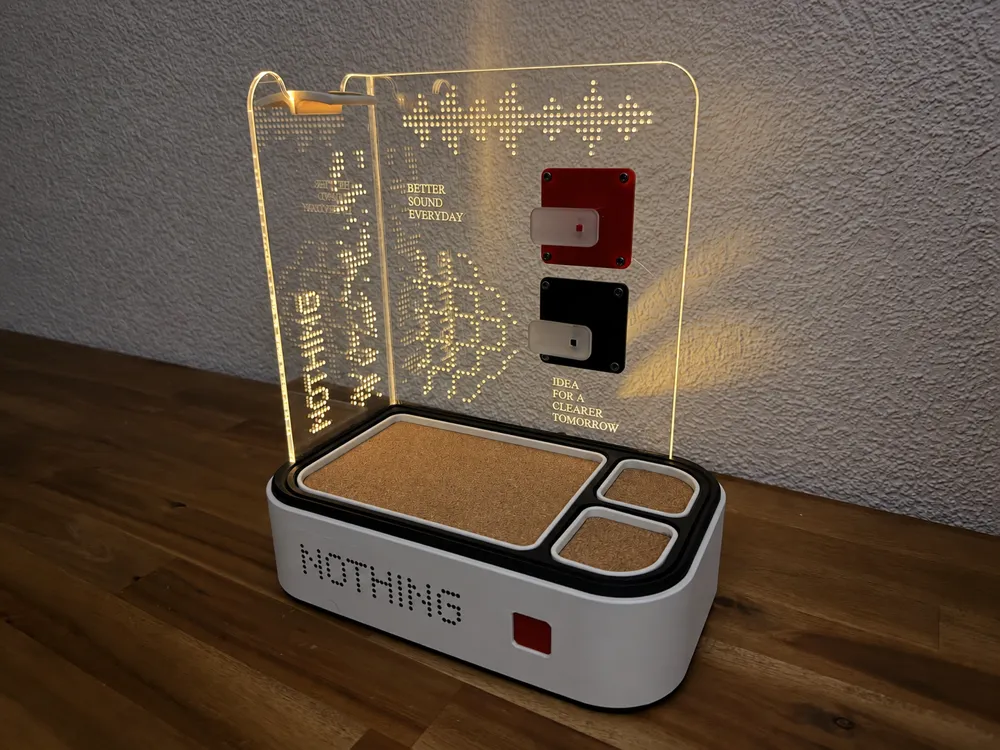
Where Sound Meets Design. Inspired by Nothing's iconic design language, the SoundStation combines minimalism, functionality, and modern aesthetics in one unique accessory. Featuring illuminated laser-engraved acrylic panels, a dedicated headphone holder, integrated cable management, and three cork-lined compartments for everyday essentials. The combination of 3D-printed parts, transparent acrylic, subtle lighting, and natural cork creates a clean, futuristic look that perfectly complements Nothing's design philosophy. More than just a headphone stand – a stylish centerpiece for your desk. One Station. Everything in Place. Boost MeThank you Step 1 – Electronics Install all electronic components as shown. Connect the two LED strips to ports 1 and 2, the connectors underneath, and the push button to the first port. All components are included in the BOM. Step 2 – Outer Housing Attach the white outer housing and press it firmly into place until the front and rear holes align. Make sure the cable passes through the small cutout near the button. Step 3 – Wiring Overview Here is another view of the wiring for better understanding. The two small mounting holes at the back of the 3D-printed housing are used to secure the electronics. Step 4 – Secure the Electronics Fasten the electronics using two M2×5 self-tapping screws, as shown. Both screws are listed in the BOM. Step 5 – First LED Strip (200 mm) Use superglue to attach the black LED mounting piece first. Then carefully insert the 200 mm LED strip using your fingernail. It should stay in place without glue, but a few small glue dots can provide extra security. Step 6 – Second LED Strip (100 mm) Repeat the same process on the other side, this time using the shorter 100 mm LED strip. Step 7 – Test the Lighting Press the button to check that both LED strips work. Secure the button assembly with M2×5 screws using the two mounting holes. Make sure the cables run along the sides rather than across the raised sections in the middle. Step 8 – Inner Housing Insert the 3D-printed inner housing as shown, making sure everything fits properly. Step 9 – Red Button Apply a small amount of superglue to the center recess and position the red button. Press it once or twice to check alignment, then hold it until the glue sets. Step 10 – Nothing Logo For the Nothing dot-pattern logo, I used transfer tape to transfer the vinyl design, including the outer border. Removing the excess material directly on the transfer tape made the process easier. It took me two attempts, so take your time! Step 11 – Nothing Logo Here you can see the finished logo design. This detail is optional, but I really like the result! Also insert the removable cork-lined trays as shown in the previous step. Step 12 – Acrylic Panels Carefully insert the transparent acrylic panels. A small drop of superglue near the upper corners can prevent them from tilting. Attach the red and black acrylic plates using M8 screws and standard nuts on the back. All hardware is included in the BOM. Step 13 – Finished! Your Nothing SoundStation is ready! Press the button to activate the lighting and enjoy your new headphone stand and desk organizer. The removable trays even hide small secret storage compartments underneath! The final picture shows the SoundStation fully equipped with headphones and everyday accessories. Enjoy your build, and have fun! 🎧
Tags
Diseñador
Dominik