
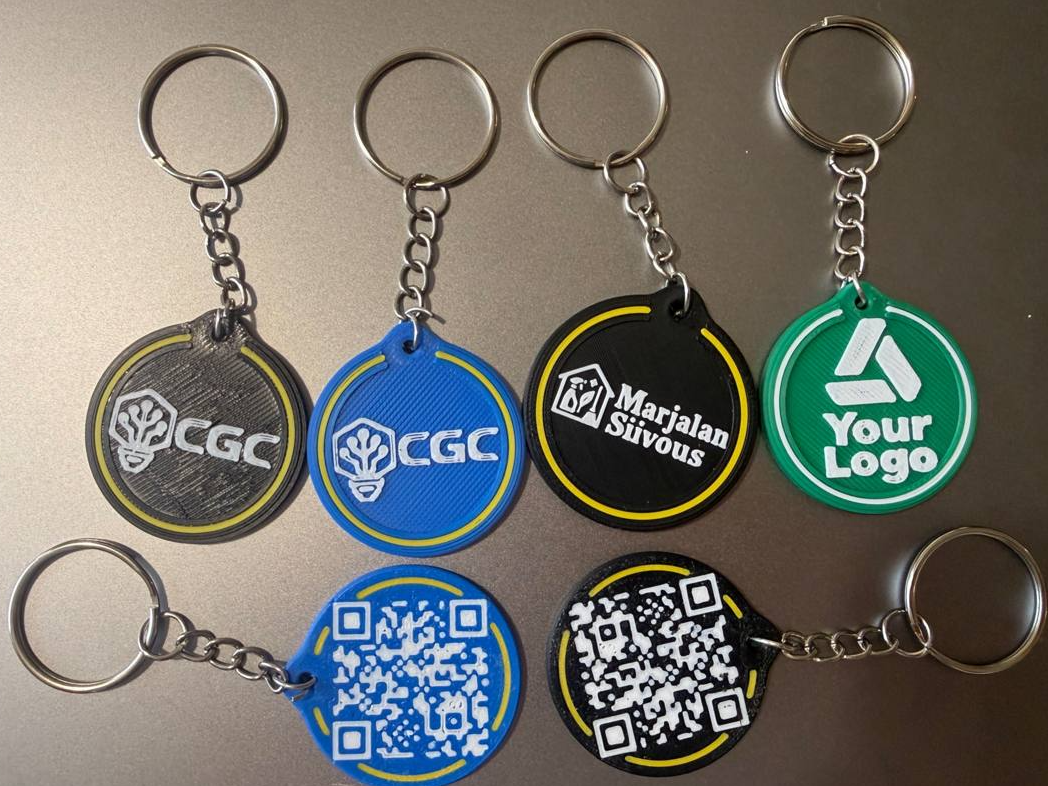
Custom Business Logo Keychain with QR Code & NFC
Peso
14g
Tiempo
58m
Precio
Cotiza este producto por WhatsApp
Contáctanos y te damos el precio según color y acabado
Las dimensiones dependen del diseño. Confirmamos las medidas exactas por WhatsApp.
Descripción
Custom Logo Keychain with QR Code & NFC 🔗 Create your own personalized keychain for FREE: https://usemtb.com/business Upload your logo, add your QR code URL, choose your colors, and generate a custom, ready-to-print 3MF file directly in your browser. No CAD skills required! About This Model This customizable keychain combines your logo, a functional QR code, and an optional hidden NFC chip in one compact, multicolor 3D print. It's designed for businesses, makers, small shops, events, and anyone who wants to turn their logo into a personalized, functional accessory. The included 3MF file is a ready-to-print example featuring a generic "Your Logo" design. To create a keychain with your own logo and QR code, simply use our free online generator. Features Custom logo: Upload your own SVG artwork and adjust its size. Functional QR code: Add a website, social media profile, digital business card, or any other URL. Optional NFC chip: Add a 25 mm NFC sticker inside the keychain for contactless interaction. Hidden NFC pocket: The chip is enclosed inside the print, keeping the exterior clean. Customizable colors: Choose your preferred colors for the base, decorative ring, and logo. Multicolor 3MF: Download a colored model ready for Bambu Studio. No CAD software needed: Generate your personalized model online. How to Create Your Own Keychain Open the free generator: https://usemtb.com/business Upload your logo in SVG format. Adjust the artwork size to fit the keychain. Enter the URL you want to encode in the QR code. Choose your preferred colors. Enable or disable the optional NFC pocket. Download your personalized colored 3MF file. Open it in Bambu Studio, check the print settings, slice, and print! Important: For reliable printing with a 0.4 mm nozzle, use clean SVG artwork with sufficiently thick lines. The generator includes an option to simplify tiny logo details. Recommended Print Settings This model was prepared using a Bambu Lab P2S with a 0.4 mm nozzle. SettingRecommended valueLayer height0.12 mmInitial layer height0.20 mmInitial layer speed20 mm/sInitial layer infill speed25 mm/sOuter wall speed200 mm/sInner wall speed300 mm/sSmall perimeters50%Small perimeter threshold10 mmSparse infill speed270 mm/sInitial layer line width0.40 mmImportant: Small Perimeter Settings For better reproduction of small logo details and QR code elements, pay special attention to these two settings in Bambu Studio: Small perimeters: 50% Small perimeter threshold: 10 mm These settings reduce the printing speed for small contours while allowing larger areas to print at higher speeds. We recommend keeping these settings when printing your own customized version, especially if your logo contains small details. How to Install the NFC Chip The optional NFC pocket allows you to embed a 25 mm NFC sticker inside the keychain during printing. NFC pocket dimensions: 25.4 mm diameter × 1 mm depth. Enable the Add NFC option in the generator before downloading your model. Open the generated 3MF file in Bambu Studio. Orient the model with the QR-code side facing down. Slice the model and inspect the internal NFC pocket in the layer preview. Add a print pause immediately before the pocket is closed. For this model, the insertion point is approximately 1.8 mm in height, but verify the correct layer in your slicer. When the printer pauses, carefully place your programmed NFC sticker inside the pocket. Make sure the NFC chip is no thicker than 1 mm and sits completely inside the pocket. Resume printing to seal the NFC chip inside the keychain. Important: Program and test your NFC sticker before inserting it. Make sure the chip is positioned securely and does not protrude into the nozzle's path. If you don't need NFC functionality, simply disable Add NFC in the generator and print the keychain without the internal pocket. Model Dimensions ParameterValueKeychain diameter37.18 mmQR code resolution29 × 29 modulesQR code area25.5 × 25.5 mmQR module size0.88 mmNFC pocket diameter25.4 mmNFC pocket depth1 mmThe dimensions shown are for this example model. Your customized version may vary depending on the generator settings. What Can You Use It For? Business promotional keychains Digital business cards QR code links to your website or social media Customer reviews and feedback Event and conference giveaways Personalized gifts Smart NFC accessories Custom branding for your own projects Create Your Own Design This example is just a starting point! You can create a completely personalized version with your own logo, colors, QR code, and optional NFC functionality in a few clicks. Free online generator: https://usemtb.com/business Created with MasterToolBox 3D — customizable 3D models, ready to print.
Tags
Diseñador
Iurii