
PLAYDECK - Modular Play Table & Stool Set
Peso
3093g
Tiempo
129h 12m
Precio
Cotiza este producto por WhatsApp
Contáctanos y te damos el precio según color y acabado
Las dimensiones dependen del diseño. Confirmamos las medidas exactas por WhatsApp.
Descripción
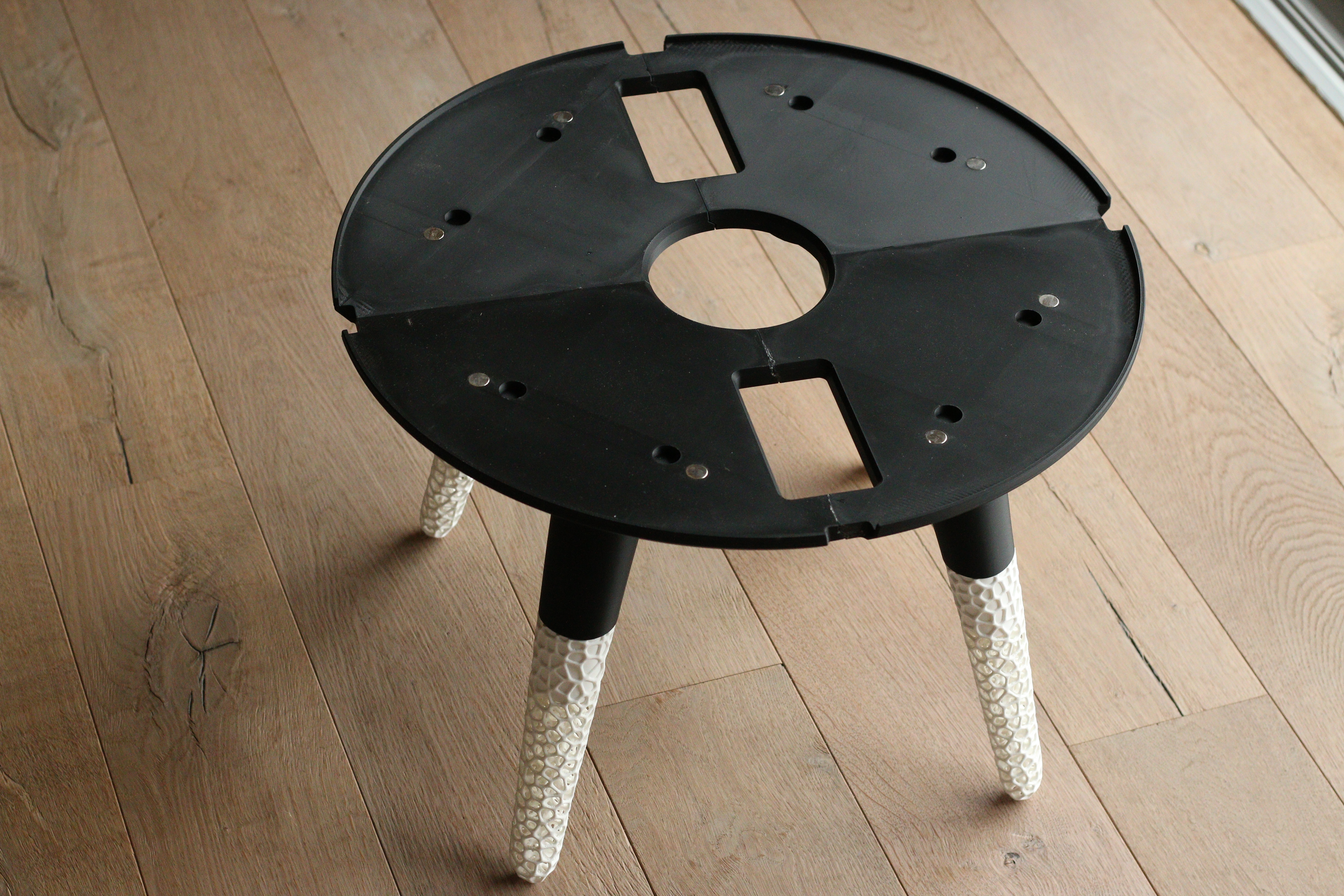
Makerworld does not accept the files for R1 yet. The laserfiles will be added tomorrow. PlayDeck – Modular Play Table & Stool Set PlayDeck is a hybrid project that combines 3D printing and laser cutting to create a modular play table with matching stools and interchangeable game decks. The design has a clean, minimalist and Scandinavian-inspired look, combining natural wood with softly shaped 3D-printed elements. The legs feature an organic lattice structure, adding a unique detail and showcasing complex geometries that are only possible to create with 3D printing. The idea behind PlayDeck is simple: the table stays, the game changes. The different play decks can be swapped depending on what your kids want to play and are held securely in place with magnets. It’s a project that combines the strengths of 3D printing and laser cutting to create something that goes beyond what either process could achieve on its own. 4 Interchangeable PlayDecks The project currently includes four different play options: Ludo – a colorful classic board game for up to four players Card Game Deck – a dedicated playing surface with integrated card holders Jenga Deck – for stacking and balancing games Building Block Deck – a simple play setup designed especially for younger children Each deck can be removed and replaced while the main table remains in place. Magnets help position and secure the individual decks. A True Hybrid Project This is not just a 3D-printing project. PlayDeck was designed from the beginning as a combination of laser-cut wooden components and 3D-printed parts. You don’t need to be an experienced woodworker to build it, but this is also not a simple print-and-assemble project. Some parts need to be carefully aligned and glued, and you’ll need basic tools such as clamps to hold the wooden components in place while the glue cures. Take your time during assembly – proper alignment and a clean glue-up are important for the final result. I will provide a separate BOM (Bill of Materials) with all additional hardware, tools and materials required for the build. Before You Start Please be aware that this is a large and print-intensive project. It requires a significant amount of filament, a lot of printing time and several wooden parts. The wood and additional materials also add to the overall cost. Assembly takes time as well. So before starting, I recommend checking the complete BOM, print times and material requirements and deciding whether you want to commit to the full build. This is intentionally not a quick weekend print – PlayDeck is a proper furniture project. Materials MakerWorld unfortunately doesn’t offer sheets in the required size at the moment. I hope they will become available soon. I sourced mine from this supplier*, but I’m not sure if they ship to all countries. You can use sheets from any supplier, as long as they are 600 × 300 mm and 3 mm thick. Dimensions Table Height: 412 mm Diameter: 588 mm Stool Height: 252 mm Diameter Seat: 250 mm Step-by-Step Assembly Guide I’ve created a very detailed step-by-step assembly guide to help you build PlayDeck correctly and avoid mistakes during the process. The guide walks you through the assembly in the correct order and covers the important details for putting everything together properly. I strongly recommend following this guide, especially since this is a larger project with many individual parts. The complete guide is available as a PDF attached under the Assembly Guide section. Please take a look at it before starting the build and keep it nearby during assembly. Printer Compatibility The current first version requires a Bambu Lab H2-series printer due to the size of some printed components. I’m already working on an additional version that will make it possible to build PlayDeck using printers with an approximately 250 × 250 mm build area. ⚠️ Important Print Settings Please use the provided print profiles, orientations and settings for all parts. These are the settings the parts were designed and tested with. Especially for structural components, changing wall counts, infill, orientation or other relevant parameters can significantly affect their strength. I cannot guarantee the same stability when using untested print settings. Make It Your Own One of the best parts of PlayDeck is how much you can customize it and make it your own. Different filament colors, wood types and finishes can completely change the character of the set. You can also add your own laser engravings, names, graphics or patterns to the wooden parts to create a truly personal version. And customization doesn’t have to stop with the included games: use the provided files as a starting point and design your own interchangeable PlayDeck. Create a new board game, learning activity, puzzle, creative surface or something completely different that fits into the modular system. I’d love to see what you come up with, so please share your custom decks and remixes with the community! PlayDeck is ultimately an experiment in what becomes possible when 3D printing and laser cutting are designed to work together instead of being treated as separate manufacturing methods. MembershipBoost MeInterested in some of my other Projects? *Affiliate link: I may earn a small commission if you purchase through this link, at no extra cost to you.
Tags
Diseñador
JANBERRY DESIGN