
Exact-Fit Socket Organizer Generator - Version 2
Peso
163g
Tiempo
5h 28m
Precio
Cotiza este producto por WhatsApp
Contáctanos y te damos el precio según color y acabado
Las dimensiones dependen del diseño. Confirmamos las medidas exactas por WhatsApp.
Descripción
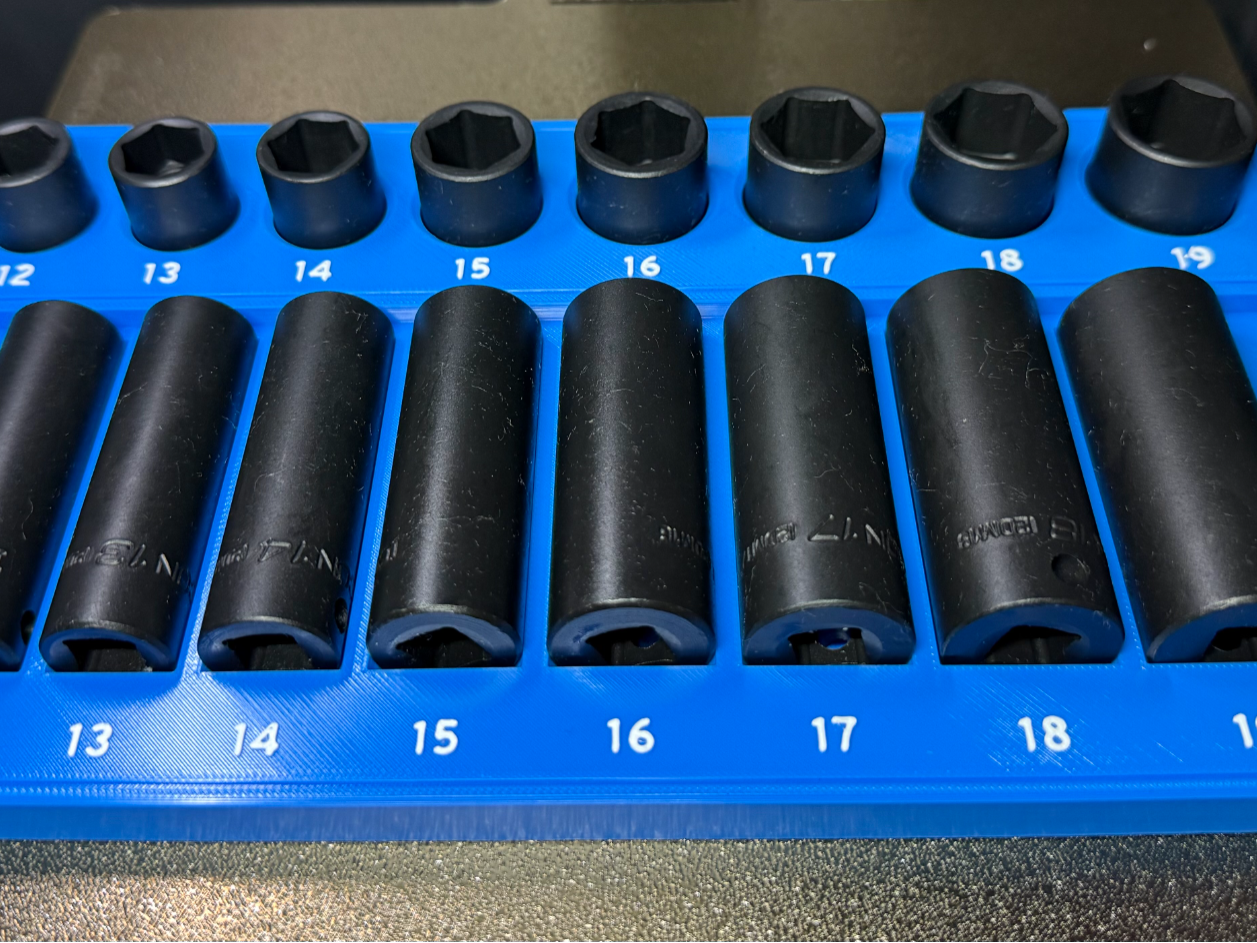
Boost MeEnjoyed the profile or found the included options and print settings helpful? Please consider giving it a Boost—it helps support future uploads, testing, and profile improvements.Parametric Socket Organizer Generator V2 - 09/14/2026 - UPDATE – New Gridfinity Full Grid Option Version 2 now includes a new Gridfinity Body Fit setting with two choices: Compact keeps the organizer body as small as possible around the socket layout, which saves filament. Full Grid expands the organizer body to complete Gridfinity cell dimensions. This uses more filament, but it allows separately generated trays to line up much more cleanly next to each other with only the normal Gridfinity spacing instead of larger irregular gaps between tray bodies. If you are building multiple organizers that will sit side-by-side in the same drawer, Full Grid is the recommended option for the cleanest overall fit and appearance. The existing Compact behavior has been preserved, so users who prefer the smallest possible organizer can continue using it exactly as before. Version 2 expands the original Parametric Socket Organizer Generator with a major new feature: each socket can now be stored Vertical or Horizontal independently. This makes it possible to build much more compact organizers, especially for deep sockets and shallow toolbox drawers. One of the best uses for V2 is combining matching shallow and deep sockets in the same organizer: Shallow sockets stand vertically on the raised rear row, while deep sockets lie horizontally on the lower front row. This keeps matching socket sizes together while dramatically reducing the overall height normally required when deep sockets are stored upright. The generator is not limited to ICON or any particular socket brand. Measure the sockets you own, enter those measurements, and the organizer is generated around them. What's New in V2 The biggest change is individual socket orientation. Every socket has its own: Vertical / Horizontal selector. That means a single organizer can contain: All Vertical sockets All Horizontal sockets A combination of Vertical and Horizontal sockets The mixed layout was physically print-and-fit tested using ICON 3/8" impact sockets, with shallow sockets stored vertically and matching deep sockets stored horizontally. The final fit passed. Generator Features Up to 16 sockets per organizer Individual Vertical or Horizontal orientation for every socket Mix Vertical and Horizontal sockets in the same organizer One Row, Two Rows, Three Rows, or Auto layouts Automatic compact-layout search Flat or integrated Gridfinity base Adjustable pocket and cradle clearances Adjustable edge margins and socket spacing Fixed insertion depth for Vertical sockets Uniform exposed-height option for Vertical sockets Raised labels Recessed labels Labels Off Adjustable label size and relief Separate Tray Body and Labels outputs for multicolor printing Pocket Test Coupon for checking fit before printing a complete organizer Enable or disable individual sockets Optional diameter sorting Why Store Deep Sockets Horizontally? Deep sockets can require a significant amount of vertical drawer clearance when stored upright. V2 gives you another option. When a socket is set to Horizontal, the generator creates an open-top cradle sized around the socket body and its full length. This can substantially reduce the required organizer height. For example, a deep socket approximately 60–70 mm long no longer needs that much vertical drawer clearance when stored horizontally. This is particularly useful in shallower toolbox drawers. Recommended Mixed Shallow + Deep Layout For matching shallow and deep sockets, I recommend: Rear / Upper Row: Shallow sockets — Vertical Front / Lower Row: Deep sockets — Horizontal For this layout, the order in which you enter the sockets matters. Enter them in this order: 1. Enter all Vertical shallow sockets first. These will be placed on the raised rear/top row. 2. Enter all Horizontal deep sockets second. These will be placed on the lower front row. 3. Select Two Rows. 4. Leave Sort by Diameter OFF. This is important. Sorting changes the socket order and can break the intentional shallow/deep row grouping. For a deliberately arranged mixed organizer, keep sorting disabled. Three-Row Layouts When using a Three Row layout, sockets are assigned sequentially: First group → Rear row Second group → Middle row Final group → Front row Keep that order in mind when entering sockets for a manually planned organizer. Auto Layout If you do not need specific sockets assigned to specific rows, you can use: Layout → Auto Auto evaluates One Row, Two Row, and Three Row arrangements and selects a compact layout based on the calculated organizer footprint. For a deliberate mixed shallow/deep organizer, I recommend selecting Two Rows manually instead of Auto. Socket Measurements All measurements are entered in millimeters. For each socket, enter: Drive OD Outside diameter at the square-drive end. Max OD The largest outside diameter anywhere on the socket. Rotate the socket while measuring with calipers to make sure you find the actual maximum diameter. Overall Height The complete end-to-end length of the socket. Label Whatever text you want printed on the organizer. Examples: 10 13 3/8 7/16 Orientation Choose either: Vertical or Horizontal Important Horizontal Socket Note You do not need to measure and enter a separate socket length. For a Horizontal socket, the generator uses the entered: Overall Height as the socket's axial length. So the same measurement field works for both orientations: Vertical: Overall Height = standing socket height Horizontal: Overall Height = socket length Vertical Socket Pocket Depth Vertical sockets support two pocket-depth modes. Fixed Insertion Every Vertical socket uses the same insertion depth. This is the simplest option and works well for many socket sets. Uniform Exposed Height The generator adjusts insertion depth based on each socket's Overall Height so sockets of different heights can have a more consistent exposed height above the organizer. Horizontal sockets use their own cradle geometry and are not affected by the Vertical insertion-depth system. Labels Three label modes are available: Raised Text projects above the organizer surface. Recessed Text is engraved into the organizer. Off No labels are generated. Label size, embed depth, and relief can also be adjusted. For most organizers I prefer Raised labels, especially when using multicolor printing. Multicolor Printing For multicolor organizers, the generator can output the body and labels separately. Select: Tray Body to export the organizer itself. Then select: Labels to export the text. Both outputs share the same final coordinates, so they can be imported into the slicer together without manually realigning them. This works well for AMS/multicolor printing. Pocket Test Coupon Before printing a full organizer for a new socket set, use: Pocket Test Coupon This creates a small fit-test piece for the selected socket. Printing the coupon first can save a significant amount of filament and print time if your printer or filament requires slightly different dimensional clearance. This is especially useful when dialing in a new filament or using measurements from a socket family you have not printed before. Gridfinity V2 includes both: Flat Base and Gridfinity options. The integrated Gridfinity base uses the standard 42 mm grid system. The upper organizer is still sized from the actual socket dimensions, spacing, labels, and layout. Because of this, a large organizer may require additional Gridfinity cells to keep the complete upper organizer supported. If keeping adjacent Gridfinity positions completely clear is important, check the generated footprint before printing. Recommended Print Settings These are the settings I recommend based on the finished organizer prints: Material: PETG Layer Profile: 0.16 mm Standard Supports: Not required for normal organizer geometry Seam: Aligned Why 0.16 mm Standard? I recommend 0.16 mm Standard instead of 0.20 mm Standard for these organizers. The finer layer height produces noticeably better: Raised text quality Letter and number definition Label edges Top surfaces Overall finished appearance The additional print time is worth it for an organizer that will likely remain in the toolbox for years. Seam Setting Use Aligned seam. During physical testing, Random seam produced small tactile bumps across the organizer surfaces. Aligned seam concentrated the seam in a much less noticeable area and produced a cleaner finished part. Filament The organizer has been successfully printed in PETG, which is my preferred material for toolbox use. PLA should also work well for normal drawer storage. PETG offers a little more heat resistance and toughness, which can be useful in a garage or toolbox environment. Fit and Printer Calibration This generator creates pockets from the measurements you enter, but dimensional accuracy still depends on your printer, filament, and calibration. If a fit is too tight or loose: Double-check the physical socket measurement. Print the Pocket Test Coupon. Adjust the appropriate clearance setting if necessary. Reprint the coupon before committing to the entire organizer. Different printers and materials may require slightly different clearances. Maximum Organizer Size The generator supports up to 16 sockets per organizer. This limit is intentional. Very large socket collections can create organizers that become unnecessarily large and difficult to print or handle. For larger socket sets, splitting the collection into two or more organizers generally produces a much more practical result. For example, a full shallow/deep metric collection can be divided into smaller logical groups rather than trying to place every shallow and deep socket into one massive tray. V1 vs. V2 The original Parametric Socket Organizer Generator V1 will remain available. V1 Best if you want a simpler traditional organizer with sockets stored vertically. https://makerworld.com/en/models/3173022-exact-fit-socket-organizer-generator-customizable#profileId-3587580 V2 Choose V2 if you want: Horizontal socket storage Mixed Vertical + Horizontal sockets Matching shallow and deep sockets in one organizer Reduced drawer-height requirements More flexibility in how the organizer is arranged V2 does not replace V1. It adds another option for users who need the additional layout flexibility. Physically Tested Mixed Layout The V2 mixed-orientation design was physically tested using ICON 3/8" metric impact sockets. The test organizer used: Rear/top row: Shallow impact sockets stored Vertical Front/lower row: Matching deep impact sockets stored Horizontal The final printed organizer passed the physical fit test for both the Vertical pockets and Horizontal cradles. The generator itself remains fully parametric and can be used with other brands and socket families by entering your own measurements.
Tags
Diseñador
DT1035