
DnD Visual Damage, HP Tracker & Initiative Stand
Peso
109g
Tiempo
5h 24m
Precio
Cotiza este producto por WhatsApp
Contáctanos y te damos el precio según color y acabado
Las dimensiones dependen del diseño. Confirmamos las medidas exactas por WhatsApp.
Descripción
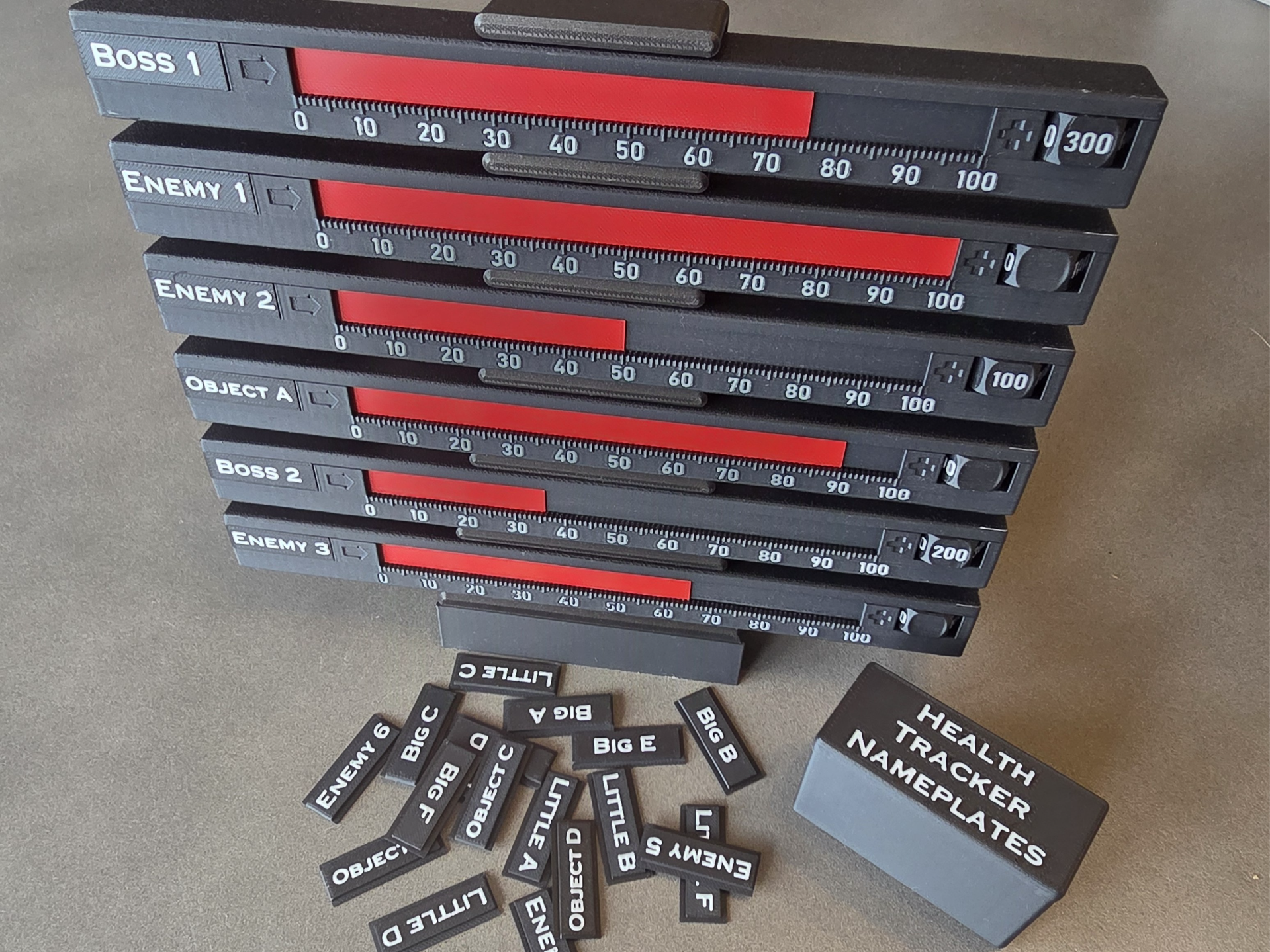
DnD Visual HP / Damage Tracker + Initiative Stand I wanted a physical way of tracking enemy HP during DnD encounters without constantly updating notes or asking, “how much damage had that one taken again?” Each reusable tracker has a sliding red 0–100 bar, interchangeable nameplates and a 0–600 selector for higher-HP enemies. The stand holds up to six trackers and can also be used to show initiative order. How it works Our group normally starts at 0 and counts damage upwards. For example: Selector: 200 Bar: 47 Damage taken: 247 You can just as easily use it for remaining HP instead. Set the creature to its starting health and count down towards zero as damage is taken. The main bar covers 0–100, while the selector on the right adds additional hundreds. This keeps the scale large and easy to read rather than trying to squeeze 600 points onto one long slider. Features 0–100 sliding visual HP / damage bar 1-point graduations, numbered every 10 0–600 selector for bosses and larger enemies Interchangeable slide-in nameplates Editable nameplates – customise the text directly in Bambu Studio Screenshots included showing how to edit the nameplates Six-tracker display stand Stand can double as an initiative tracker Magnetic centring in each stand position Separate holder for spare nameplates that is storable in the stand Initiative order I use the stand from top to bottom as the encounter initiative order: Top = acts first Bottom = acts last This makes it easy to see both who acts next and how much damage each enemy has taken. Because the trackers simply lift out, they can easily be moved if initiative changes, a new enemy joins combat or a creature is removed. The interchangeable nameplates also make it much easier to distinguish between similar enemies such as Enemy A, Enemy B, Boss 1, Object A, etc. To adjust damage: Pull tracker out → adjust bar/selector on the rear → drop it back into position. Each shelf loosely holds the tracker around its centre. A recessed 6 × 2 mm magnet in the tracker and shelf helps centre it and gives a light locating “click”; the magnet is not intended to carry the tracker by itself. Customisable Nameplates The nameplates are designed to be easily edited directly in Bambu Studio, so you can create labels for whatever creatures, NPCs, objects or encounter names you need. No CAD software is required. I’ve included screenshots showing the process. Simply duplicate/open the blank nameplate, edit the text in Bambu Studio, position it on the plate, recolour if you want and print. This means you can print the trackers once and then create new nameplates whenever you need them for future encounters. The plates slide in and out from the side, and a separate holder is included for storing the ones you aren’t currently using. Printing notes The supplied print profile is set up to print one tracker at a time for reliability. That said, I have successfully printed up to four bottom halves on one plate and recommend doing this to save on the inevitable wasted flushed filament from colour changes. The long parts are deliberately angled at around 45° across the bed rather than running parallel with the outer bed edges. These are long, flat pieces and can be prone to corner lifting, so I have also added brim/mouse ears to the vulnerable corners. I recommend leaving these in place. My successful setup on a Bambu Lab P1S: 0.4 mm nozzle 0.12 mm layer height 0.20 mm first layer PLA Textured PEI AUX fan off for the large flat parts The thin red health bar is also printed in PLA and is designed to flex around the internal 180° channel. Batch printing I strongly recommend printing several 0–600 selector wheels/nuts at once, as well as the bottom half of the tracker. These parts contain multiple colour changes, so batching them means each colour swap produces several parts instead of one, improving both print-time and filament efficiency. The same applies to nameplates. If you know which ones you want, printing them as a batch is much more efficient than printing them individually. Magnets The stand and container uses 6 mm diameter × 2 mm thick magnets: one in the bottom centre of each tracker one in the centre of each shelf 8 for the holder/container Keep the polarity consistent across the full set. The magnets are only there to centre the tracker and give some retention. The shelf itself supports the tracker. Other TTRPGs Although designed for Dungeons & Dragons, the tracker should work with most games using numerical HP, wounds, stamina or damage pools, including: Pathfinder 1e / 2e 13th Age Shadowdark Dungeon Crawl Classics OSR / d20 systems Homebrew RPGs Skirmish and board games with damageable units or objectives The removable nameplates also mean the trackers can represent creatures, NPCs, vehicles, doors, objectives or environmental hazards. I mainly wanted something that answered three questions at a glance: Which enemy is this? When does it act? How much damage has it taken? Hopefully it’s useful at your table too. Happy gaming and printing!
Tags
Diseñador
MJ925