
Customizable Safety Wristband – Text,Icon & SVG
Peso
9g
Tiempo
30m
Precio
Cotiza este producto por WhatsApp
Contáctanos y te damos el precio según color y acabado
Las dimensiones dependen del diseño. Confirmamos las medidas exactas por WhatsApp.
Descripción
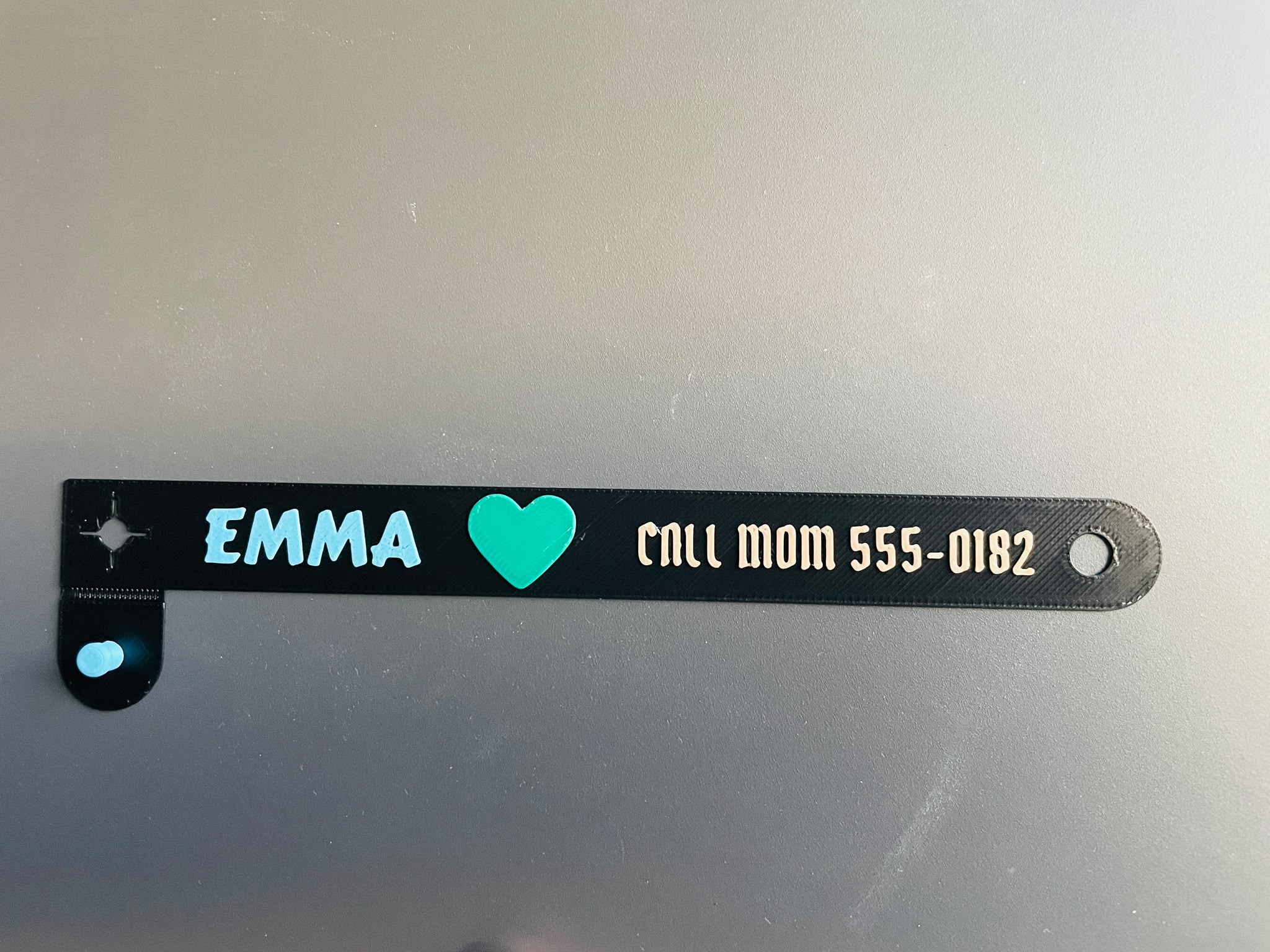
🪪 Create Your Own Personalized Wristband Add a name, phone number, short message or identification information directly in MakerWorld Customizer. The generator supports two independent text fields, custom fonts, multiple colors and uploaded SVG graphics. Personalization can be raised, engraved or cut through the wristband. The integrated printed closure includes an adjustable post, rounded cap, cross-slit anchor hole and configurable adjustment holes—no additional hardware is required. 📏 Default Dimensions Length: 210 mm Width: 16 mm Thickness: 0.6 mm Adjustable thickness: 0.5–0.8 mm The length, width, hole pattern and closure dimensions can also be customized. 🎨 Default Content 🔵 Text Line 1 ❤️ Red SVG 🩷 Text Line 2 Replace the default text with a name, phone number or your own short message. ✨ Features 📐 Fully parametric MakerWorld model 🔤 Two independently controlled text fields 🖋️ MakerWorld and Google font support 🖼️ Custom SVG upload 🎨 Independent colors for the band, text fields and SVG ↔️ Independent X/Y positioning for every content element ⬆️ Raised personalization ⬇️ Engraved or cut-through personalization 🧩 Four selectable content layouts 🔘 Adjustable hole count, diameter and spacing 🔒 Integrated printed closure ✂️ Automatic removal of holes that do not fit shorter bands 🛡️ Automatic content clipping inside the available area 🔩 No additional hardware required 🧩 Available Layouts Two Lines Line 1 + Line 2 + SVG Line 1 + SVG + Line 2 SVG + Line 1 + Line 2 The default layout is: Line 1 + SVG + Line 2 For single-row layouts, the content is positioned relative to the center between the left anchor hole and the leftmost active adjustment hole. 🛠️ How to Customize 📏 Set the band length, width and thickness. 🔘 Select the adjustment-hole count, diameter and spacing. 🧩 Choose a content layout. 🔤 Replace Text Line 1 and Text Line 2. ☑️ Enable or disable either text field. 🖋️ Select a MakerWorld or Google font. 🖼️ Upload a closed, filled SVG file. ↔️ Adjust the X/Y position of each element. 🎨 Choose the band, text and SVG colors. ⬆️ Select raised or engraved content. 👀 Inspect the generated preview. 🖨️ Slice and test-print the selected configuration. ⬆️ Raised, Engraved and Cut-Through Content Use content_height to control the result: Positive value: raised text and SVG Negative value: engraved text and SVG Negative depth greater than the band thickness: cut-through content Default content height: 0.4 mm ⚠️ Small text and thin SVG features may need to be enlarged for reliable FDM printing. 🖼️ SVG Recommendations For more reliable results: ✅ Use closed and filled paths ✅ Remove unnecessary background shapes ✅ Keep important features reasonably thick ❌ Avoid stroke-only artwork ❌ Avoid extremely small details 👀 Always inspect the generated preview before printing 💡 Suggested Uses 🧒 Child contact-information wristband 🏫 School trips and group activities 🎡 Events, festivals and amusement parks 🎂 Parties and visitor identification 🪪 Personalized name bands 🎒 Bag or equipment identification 🐾 Temporary pet identification under direct supervision 🎨 Decorative personalized wristbands 🖨️ Suggested Print Settings These are starting recommendations and should be adjusted for your printer and material: Material: PLA or another suitable material Nozzle: 0.4 mm Layer height: start with 0.20 mm Orientation: print flat on the build plate Supports: normally not expected; inspect the closure cap Brim: optional if the long band lifts at the edges Multi-color: filament changes or an AMS-compatible workflow First layer: carefully check adhesion and extrusion ⚠️ The wristband is only 0.5–0.8 mm thick. First-layer calibration, material flexibility and bed adhesion can significantly affect the result. Do not scale the completed model in the slicer when closure tolerances must remain accurate. Adjust its dimensions in MakerWorld Customizer instead. 🔒 Assembly No separate hardware is required. Wrap the band around the wrist. Insert the printed post through a suitable adjustment hole. Engage it with the cross-slit anchor opening. Check that the wristband is secure but not tight. ⚠️ Do not force the closure. If the post is difficult to insert, adjust the anchor hole or cross-slit dimensions and print a test section first. ⚠️ Important Safety Information This is a user-generated 3D-printed identification accessory. It is not certified medical, safety or tracking equipment. 👨👩👧 Children should use it only under responsible adult supervision. 👀 Do not use it as a replacement for supervision. 🔒 Personal information printed on the band remains publicly visible. 🩹 Remove it if it causes discomfort or skin irritation. 🖐️ Ensure the band does not restrict circulation. 🔍 Check for sharp edges, cracks and loose features before use. 🌡️ FDM parts may deform or break depending on material and environment. 🧪 Verify that the material is suitable for prolonged skin contact. 🧰 Perform a supervised fit and closure test before normal use. 🐾 Pet Use Warning Use on animals only under continuous supervision. This model does not include a certified breakaway mechanism and must not replace a proper breakaway pet collar. ℹ️ Known Limitations Long text may require a smaller font or manual repositioning. Available fonts depend on the MakerWorld/OpenSCAD environment. Stroke-only SVG files may not generate a printable solid. Very small text and SVG details may disappear when sliced. The default 0.5 mm cross slit may print narrower with a 0.4 mm nozzle. Closure fit depends on printer calibration, material and cooling. Deep negative content can cut completely through the thin band. Rendered and AI-generated images are visual demonstrations, not physical-test evidence.
Tags
Diseñador
BluzXz